
Movement is one of the biggest skill gaps in Call of Duty: Black Ops 7. Whether you’re grinding ranked, chasing mastery camos, or sharpening your skills in Call of Duty Black Ops 7 Bot Lobbies, your movement settings directly determine your speed, consistency, and overall gunfight dominance. BO7’s new mobility system-packed with advanced mechanics-rewards players who optimize their settings early.
This guide breaks down every optimal movement option so you can turn BO7’s fluid movement system into a competitive advantage.
Why Movement Settings Matter in Black Ops 7
Black Ops 7 introduces some of the most advanced mobility mechanics in COD history, including:
·Omnimovement 2.0
·Enhanced tactical sprint recovery
·More responsive sliding and diving
·Skill-based wall jumps
·Active defensive rolls
·Improved mantling and ledge traversal
·Deep controller tuning options
These mechanics create a game where movement is just as important as aim. Poor settings can cause:
·Unwanted mantles
·Lost sprint chains
·Sluggish slide/dive behavior
·Inconsistent wall jumps
·Wasted frames on movement transitions
Optimizing your movement removes these errors, giving you smoother flow, better survivability, and more lethal entry engagements.
Best Black Ops 7 Movement Settings (Pro Recommended)
Below is the optimized setup most commonly used by competitive players, top streamers, and high-skill controller users.
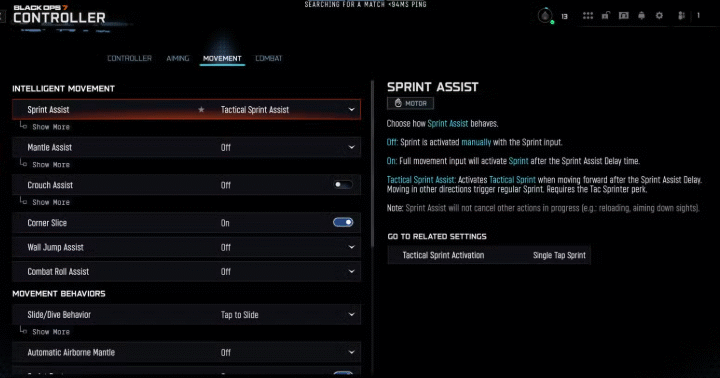
Intelligent Movement Settings
·Sprint Assist: Tactical Sprint Assist
·Mantle Assist: Off
·Crouch Assist: Off
·Corner Slice: Off
·Wall Jump Assist: Off
·Active Roll Assist: Off
Why These Work
Tactical Sprint Assist helps maintain long sprint chains without forcing unnecessary activation during gunfights.
Turning the other assists off prevents accidental movements-such as unwanted mantles, crouches, or wall jumps-which often happen during chaotic engagements. Competitive players always disable these to maintain full manual control.
Beginners may use Sideways Only Wall Jump Assist, but long-term improvement requires disabling it entirely.
Movement Behavior Settings
·Slide/Dive Behavior: Tap to Slide
·Slide/Dive Action Delay: Short
·Automatic Airborne Mantle: Off
·Sprint Restore: On
·Slide Maintains Sprint: On
·Wingsuit Activation: Manual
·Wall Jump Activation: Press
·Slide/Active Roll Behavior: Tap to Slide
·Active Roll Camera: 3rd Person
Why These Settings Are Ideal
·Tap to Slide ensures the fastest possible slide inputs, allowing better slide-cancel chains.
·Short Action Delay gives you instant responsiveness when choosing to slide or dive.
·Slide Maintains Sprint keeps your momentum high, especially for chaining movement in gunfights.
·Manual Wingsuit Activation prevents awkward activations during vertical climbs or jumps.
·Press for Wall Jump allows precise execution instead of accidental triggers.
·3rd-Person Active Roll Camera improves spatial awareness and makes defensive rolls easier to track.
These settings maximize movement precision while preserving speed.
Advanced Movement Settings
·Sprint/Tactical Sprint Behavior: Toggle
·Auto Move Forward: Off
·Auto Door Peek: On
·Grounded Mantle: On
·Tactical Sprint Activation: Single Tap Run
·Plunging Underwater: Trigger
·Sprinting Door Bash: On
Why These Are the Best Options
·Toggle Sprint/Tactical Sprint reduces thumb fatigue during long sessions while keeping your movement fast and consistent.
·Auto Door Peek On lets you safely check doorways without overcommitting.
·Grounded Mantle On allows smoother ledge climbs during chases or escapes.
·Single Tap Run improves sprint reactivation timing-critical for movement-heavy playstyles.
·Sprinting Door Bash gives you faster room entry and aggressive pressure in close-range fights.
These settings all support BO7’s aggressive movement meta.
Bonus Optimization for Controller Players
1. Adjust Deadzones for Faster, Cleaner Inputs
·Left Stick Min Deadzone: 1-3
·Right Stick Min Deadzone: 1-3
Lower deadzones mean faster response and tighter movement control.
If drift occurs, slowly increase values until drift disappears.
2. Optimal Stick Max Values for Mobility & Aiming
·Left Stick Max: 65-75
·Right Stick Max: 90-99
This combination gives you:
·Extremely responsive movement
·Strong rotational aim assist
·Control over micro-adjustments during gunfights
Perfect for aggressive players who rely on rapid directional changes.
Perfect Your Movement in Call of Duty Black Ops 7 Bot Lobbies
BO7’s movement ceiling is high. Wall jumps, slide chains, momentum resets, and precise transitions take repetition to master.
This is why many players practice in Call of Duty Black Ops 7 Bot Lobbies stress-free environment where you can focus on mechanics instead of sweating in real matches.
Players who prefer consistent, private training sessions often choose to buy CoD Black Ops 7 Bot Lobbies from trusted sellers to develop:
·Movement timing
·Slide/dive control
·Advanced wall bounce routes
·Camera manipulation
·Re-centering mechanics
·Entry and escape paths
By combining optimized movement settings with bot lobby training, you’ll drastically accelerate your improvement curve.
Final Thoughts
Black Ops 7 rewards players who master both aim and movement. With the settings outlined above, you’ll gain:
·Faster transitions
·Tighter slide mechanics
·Cleaner wall jumps
·More precise movement control
·Zero unwanted mantles or crouches
·Better survivability in close-range engagements
·Higher consistency in competitive play
Whether you’re pushing ranked, grinding weapons, or practicing in Call of Duty Black Ops 7 Bot Lobbies, these movement settings give you a real advantage in every match.